Writing
How to Do a Word Frequency Analysis (Step by Step)
Published 5 min readReviewed
On this page
- What is word frequency analysis?
- How do you do a word frequency analysis?
- What does an example look like?
- How do you count word frequency in Excel or Google Sheets?
- How do you count word frequency in Python?
- When is word frequency analysis useful?
- What mistakes skew the counts?
- How do you read the results?
A word frequency analysis counts how often each word appears in a text and ranks the words from most to least common. To do one, clean the text, make it lowercase, split it into words, decide on stop words, count each word, and sort the counts.
You can do it by hand, in a spreadsheet, or in one paste with our free Word Frequency Counter.
What is word frequency analysis?
It is a ranked list of the words in a text with the number of times each one appears. Researchers call it a frequency distribution, and the NLTK book's chapter on frequency distributions shows how to build one in Python.
Zipf's law states that a word's frequency is inversely proportional to its rank, so the 50th most common word should appear about three times as often as the 150th.
How do you do a word frequency analysis?
- Clean the text. Delete text you did not write, and fix stray spaces with the whitespace cleaner.
- Make everything lowercase, so "The" and "the" share one row.
- Split the text into words. Linguists call this step tokenization. Treat punctuation as a separator, so "mug." and "mug" count as one word.
- Decide on stop words. Stop words are common words such as "the," "to" and "and," which carry little meaning on their own. Remove them to see the topic; keep them to study style.
- Count each word. Add one to a word's tally every time it appears.
- Sort from highest to lowest. The top words dominate the text.
What does an example look like?
Here is a draft for a product page:
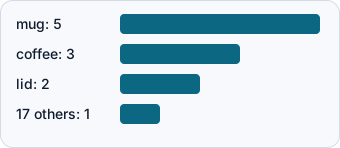
Our new travel mug keeps coffee hot for six hours. The mug fits most cup holders, and the lid locks, so your coffee stays in the mug. Coffee, tea or water: this mug handles them all. Wash the mug by hand to protect the lid.
It has 45 words. These are the top four:
| Word | Count | Share |
|---|---|---|
| mug | 5 | 11.11% |
| the | 5 | 11.11% |
| coffee | 3 | 6.67% |
| lid | 2 | 4.44% |
Skip stop words, and only 27 words remain. "Mug" now takes 18.52% of them, and the top three words all describe the product. Five uses in four sentences is a lot, so swap one for "it."
How do you count word frequency in Excel or Google Sheets?
Use LOWER, SUBSTITUTE and LEN, which both apps share. Paste your text into A1. In B1, this formula lowercases the text, swaps periods, commas and colons for spaces, and pads each word:
=" "&SUBSTITUTE(LOWER(SUBSTITUTE(SUBSTITUTE(SUBSTITUTE(A1,"."," "),","," "),":"," "))," "," ")&" "
Type the words to check in C2 and below. Put this in D2 and fill it down:
=(LEN($B$1)-LEN(SUBSTITUTE($B$1," "&C2&" ","")))/(LEN(C2)+2)
Excel returns the table's counts. The padding matters because SUBSTITUTE matches parts of words: without it, "the" returns 6, since it also matches "them."
Add a SUBSTITUTE for each other punctuation mark.
How do you count word frequency in Python?
Python's Counter counts items in a list. This snippet lowercases the text, splits it into words and prints the top four:
import re
from collections import Counter
words = re.findall(r"[a-z']+", open("sample.txt").read().lower())
print(len(words), Counter(words).most_common(4))
For the sample, it prints 45 [('mug', 5), ('the', 5), ('coffee', 3), ('lid', 2)].
When is word frequency analysis useful?
It helps you edit, check keywords, review essays and compare texts:
- Editing. Skip stop words and scan the top ten for words you can vary.
- SEO. Check that expected terms appear and none sounds forced. Google calls "repeating the same words or phrases so often that it sounds unnatural" keyword stuffing, so don't chase a density target.
- Essays. Find the word that carries every paragraph, then confirm the length with a quick word count. To add length honestly, see how to reach an essay word count without padding.
- Research. Compare speeches, survey answers or reviews. For a keyword list, clean the list first so duplicates do not inflate the counts.
A word cloud sizes each word by its frequency: a quick picture, but no exact numbers.
TF-IDF (term frequency times inverse document frequency) gives less weight to words that appear in many documents, so words typical of one text stand out. Scikit-learn's guide explains the formula.
What mistakes skew the counts?
Watch for four mistakes:
- Punctuation: "mug" counts 4, not 5. Split on punctuation.
- Mixed case: "the" counts 4 + 1. Lowercase first.
- Stop words left in: "the" ties "mug." Skip them for topic work.
- Plurals: "mug" and "mugs" differ. Use a stemmer.
In the NLTK book's raw count of Moby Dick, the comma tops the list (18,713), and "but" (1,113) and "But" (705) appear separately.
A stemmer cuts words down to a shared root, while a lemmatizer maps them to a dictionary form. The NLTK book shows the Porter stemmer turning "lying" into "lie" and the WordNet lemmatizer turning "women" into "woman." Both make mistakes, so check merged rows by eye.
How do you read the results?
Read counts against the length of the text. Five uses in 45 words stand out; five uses in 2,000 words barely register.
Then look at n-grams, groups of neighboring words. A bigram is a pair of words, and in the sample, "the mug" appears 3 times. Our tool can count two- and three-word phrases, too.
Related tools
Related guides
- Writing
How Many Words Is 5 Pages Double Spaced? (1 to 10 Pages)
Five double-spaced pages are about 1,250 words, and five single-spaced pages about 2,500. See a table for 1 to 10 pages and why your own count may differ.
- Writing
AMCAS Personal Statement Character Limit: 5,300 Explained
The AMCAS Personal Comments essay allows 5,300 characters, and spaces count. See how many words that is, what counts, and how to check your draft first.
- Writing
Twitter Character Limit: How X Counts Your 280 Characters
The Twitter (X) character limit is 280 for a standard post. Learn how links, emoji and other scripts are counted, and how to check a post before you send it.